A character sheet for Android, iOS and macOS

Your crawler is going to die. Your paperwork shouldn't.

Crawler Vault is the character sheet for the Dungeon Crawler Carl tabletop RPG that does the arithmetic, remembers the rules and keeps a straight face while you roll a 2.

  • Badge goes here App Store Coming soon
  • Badge goes here Google Play Coming soon
  • Badge goes here Mac App Store Coming soon
System AI

Congratulations, Crawler. You have installed a character sheet. Statistically, it is the safest decision you will make this week.

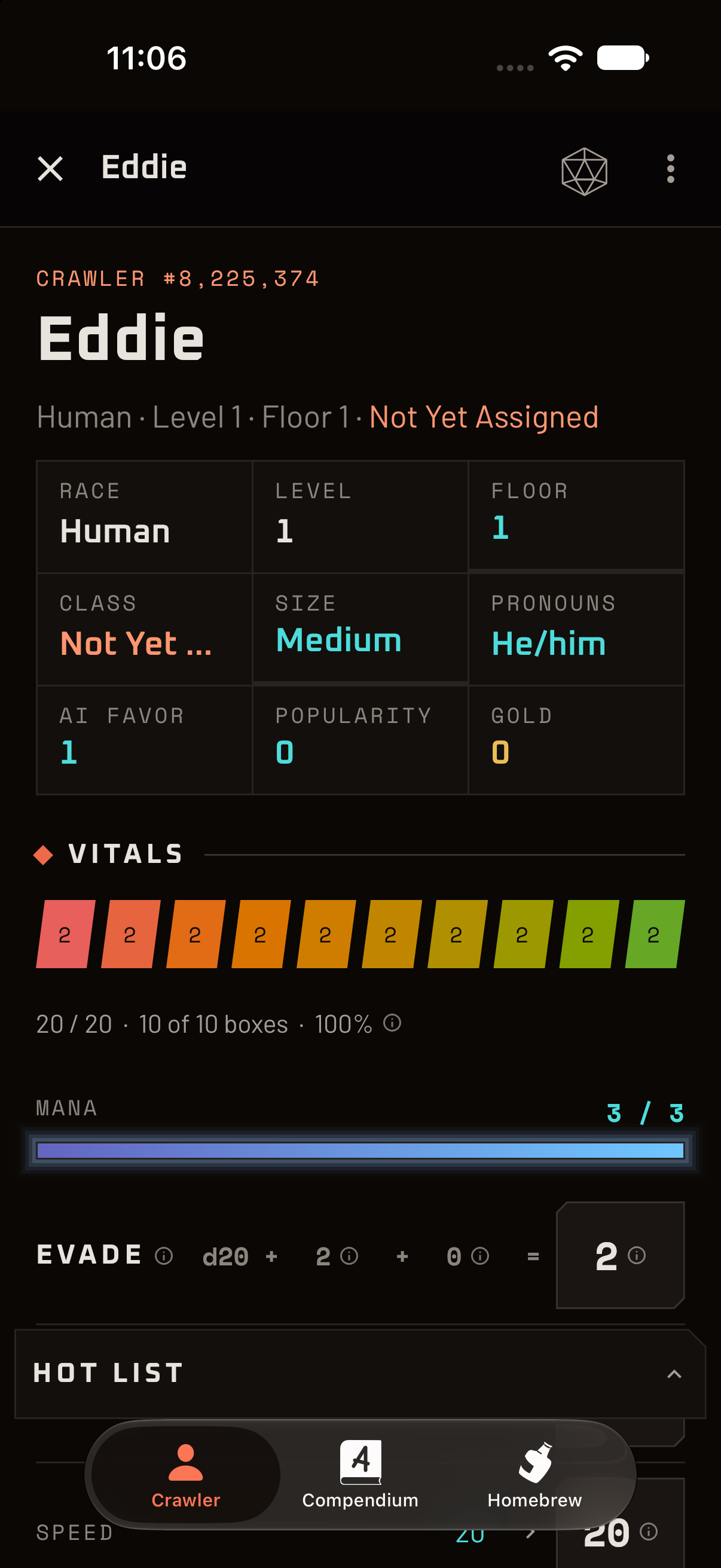
A Crawler Vault character sheet on a phone, showing stats, health and mana.

The problem

The rules are glorious. The paperwork is not.

Dungeon Crawler Carl is a game where everything affects everything. Your boots change your Speed. Your race changes your Speed again. A buff doubles it, a debuff halves it, and somebody has to decide in which order the rounding happens. Then you descend a floor, and a brand new set of rules wakes up and looks at you.

A paper sheet was never built for that. It has a lot of eraser dust, three sticky notes with “(until end of round?)” scrawled on them, and one stat that somehow got changed twice. At the table, the game stops while a player recomputes their to-hit bonus for the fourth time.

Crawler Vault takes the bookkeeping off your hands and leaves the part you came for: the choices, the dice and the terrible, wonderful ideas.

  • Numbers that depend on numbers

    Gear, race, class, buffs and debuffs all nudge the same stats. Paper makes you do it by hand.

  • Rules you have to remember

    Which buffs are active? How long is that cooldown? Is a fourth External Buff allowed? (It isn't.)

  • Building a crawler from scratch

    Seven kinds of choices, a stack of tables, and a real chance of making an illegal character.

  • Notes that go missing

    The vendor's name, the floor the cat boss was on, the thing you swore you'd never forget.

System AI

I have reviewed your paper sheet. The eraser smudges have achieved sentience and have filed a grievance.

What it does

Built to keep up with the dungeon

01 · The sheet

One sheet. Every number, explained.

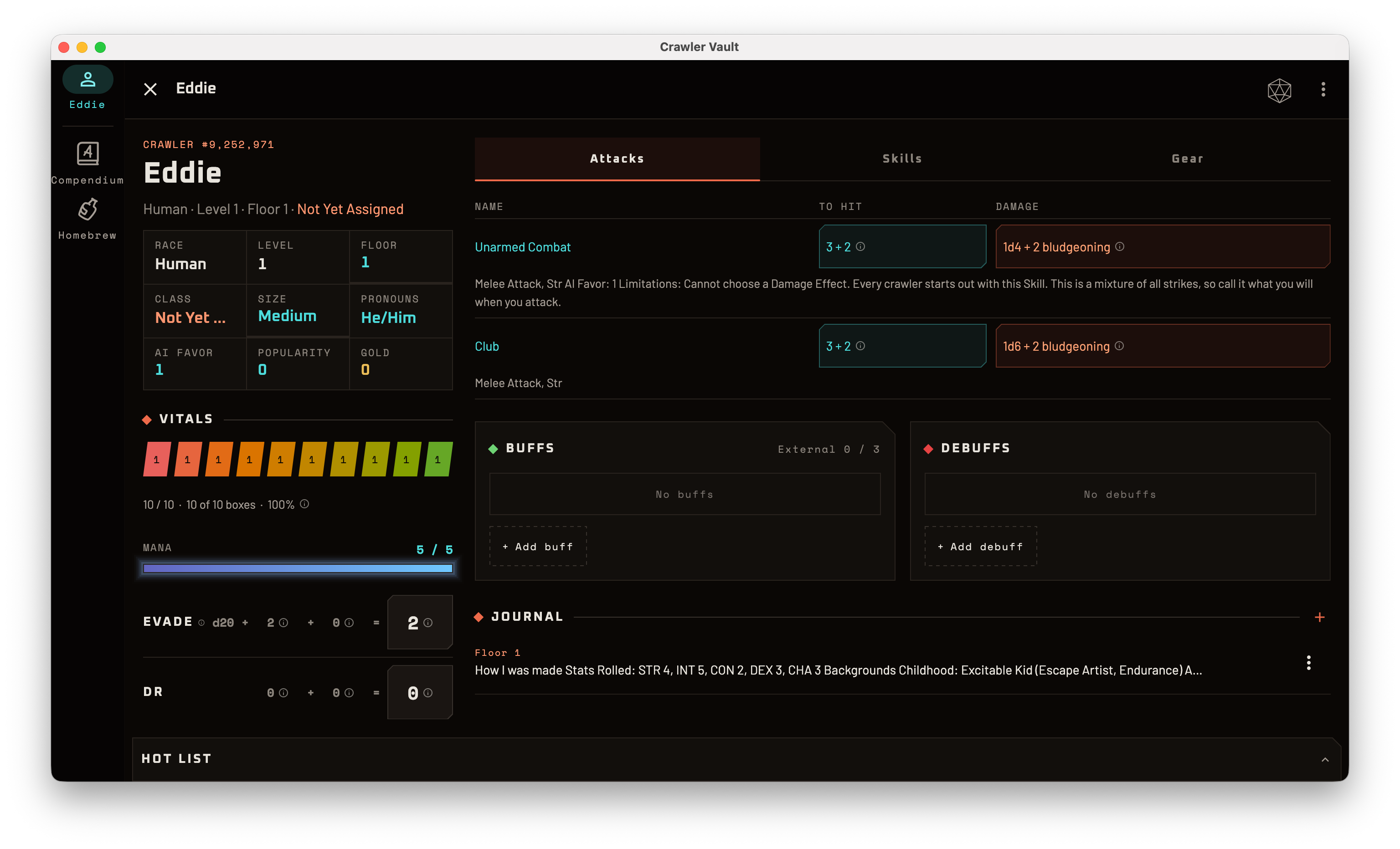
Stats, health, mana, attacks, skills and gear live on a single sheet that recalculates the moment something changes. Equip the boots and your Speed updates. Pick up a debuff and your checks do too.

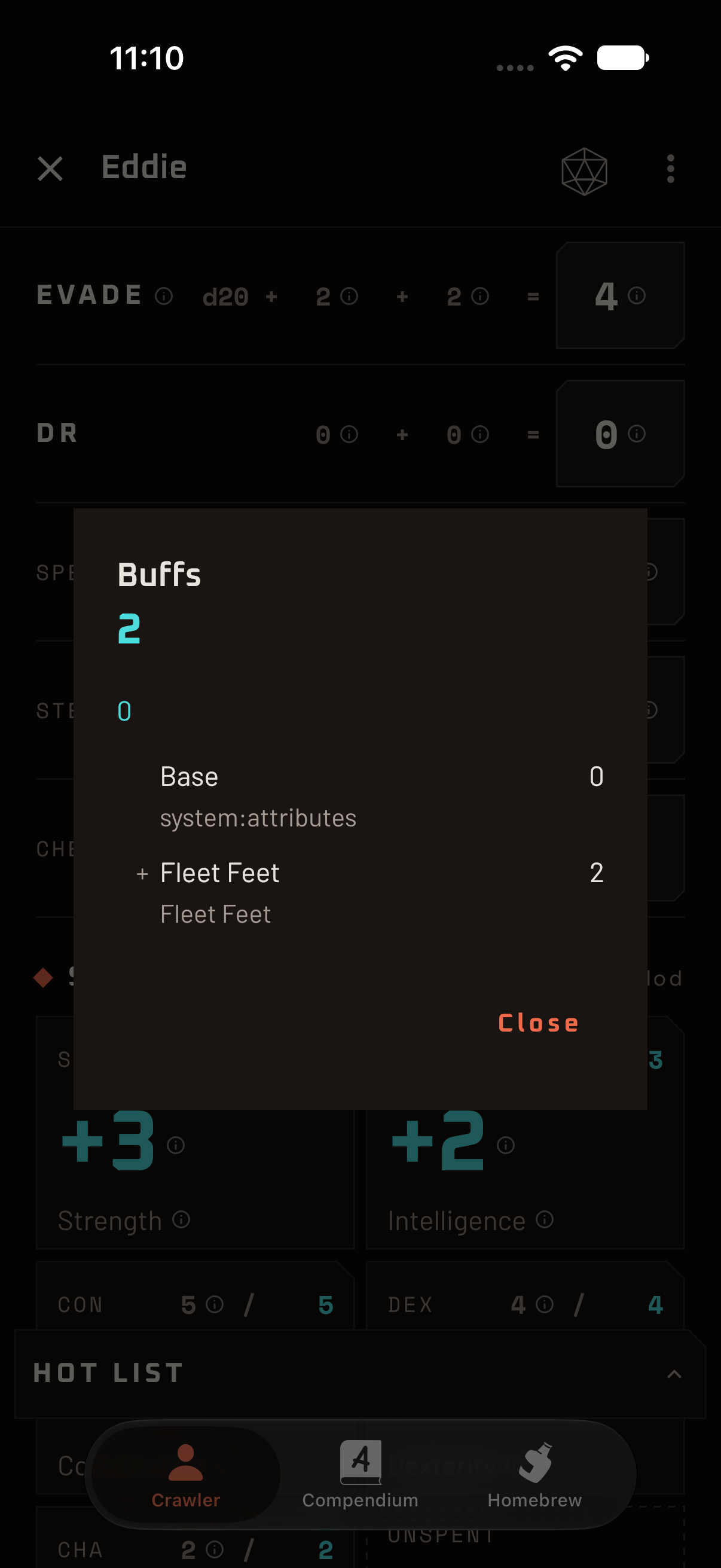
And when a number looks wrong, tap it. Crawler Vault shows you where it came from: the base, what each item, race, class or buff added or multiplied, and how it rounded. No more “I think it was twenty-something”.

  • Base and effective values side by side, with the working shown
  • Speed and Step that follow items, race, class, buffs and debuffs
  • Phone, tablet and desktop layouts, so the whole sheet fits wherever you sit
System AI

Speed 20, halved by Fatigued, doubled by Haste, rounded up because I am feeling generous. I would show my work, but I always do. It is the only thing I do for you.
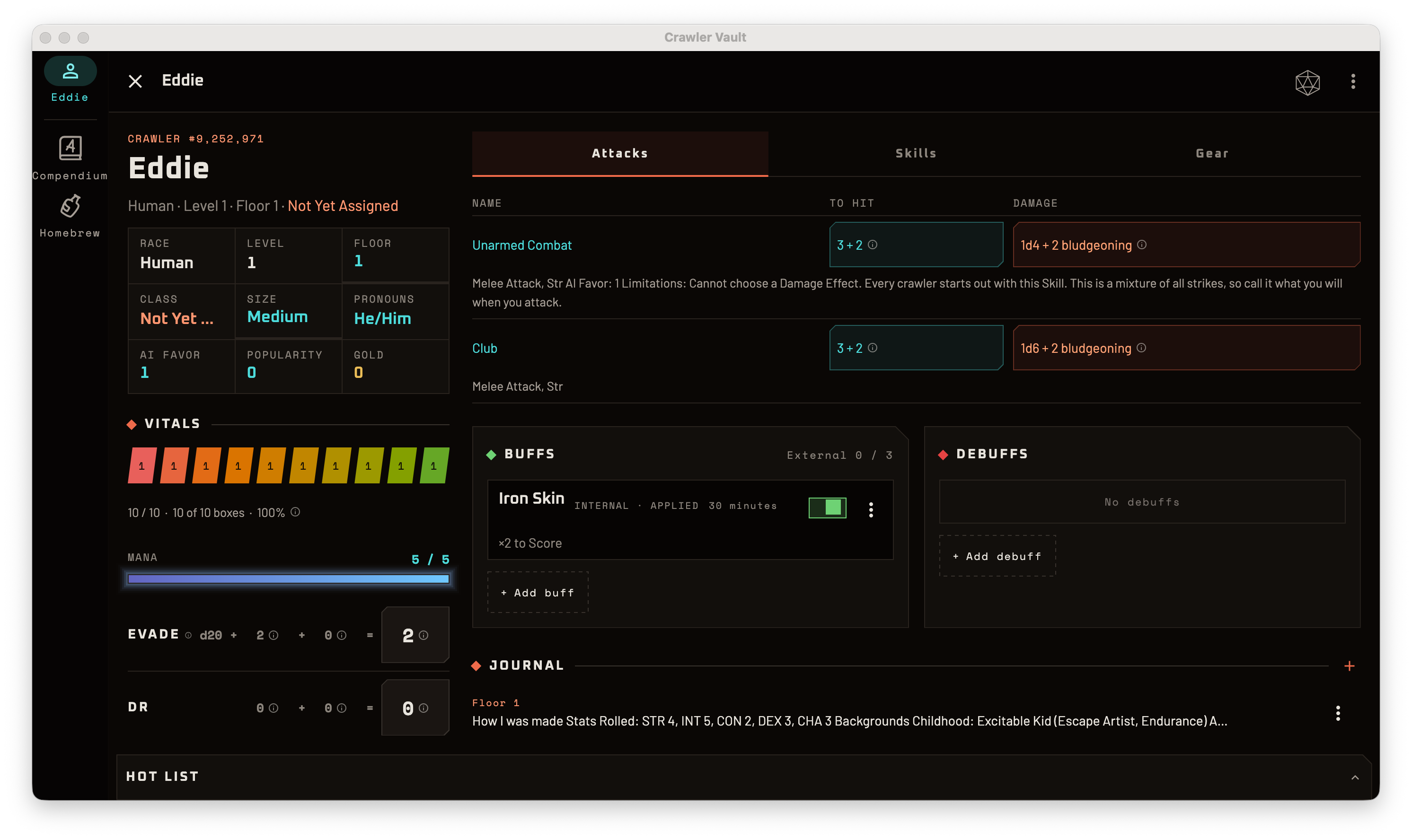
The full character sheet on a tablet, with stats, skills, gear and buffs visible together.
A dialog explaining how a character's Speed was calculated, line by line.

02 · Character creation

Seven steps to a crawler that is actually legal.

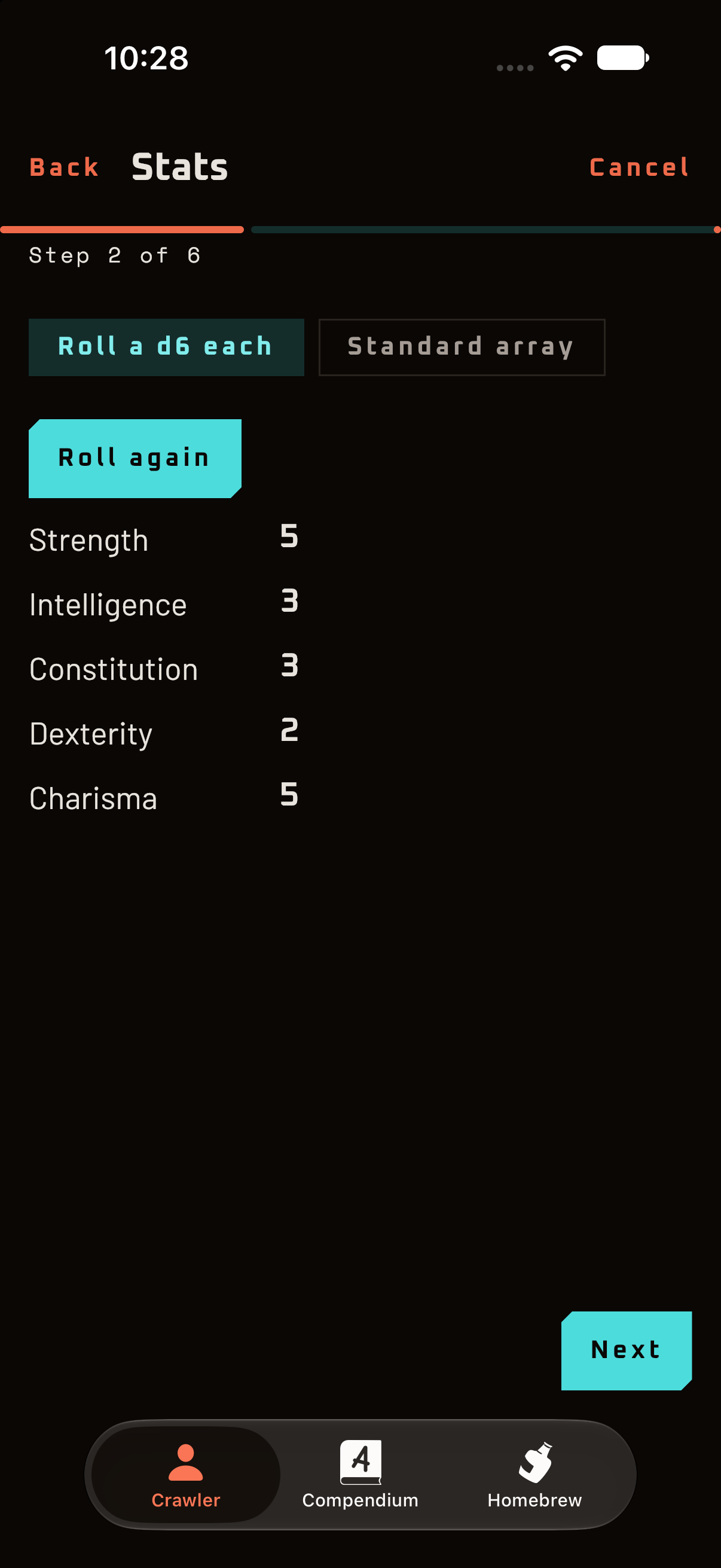
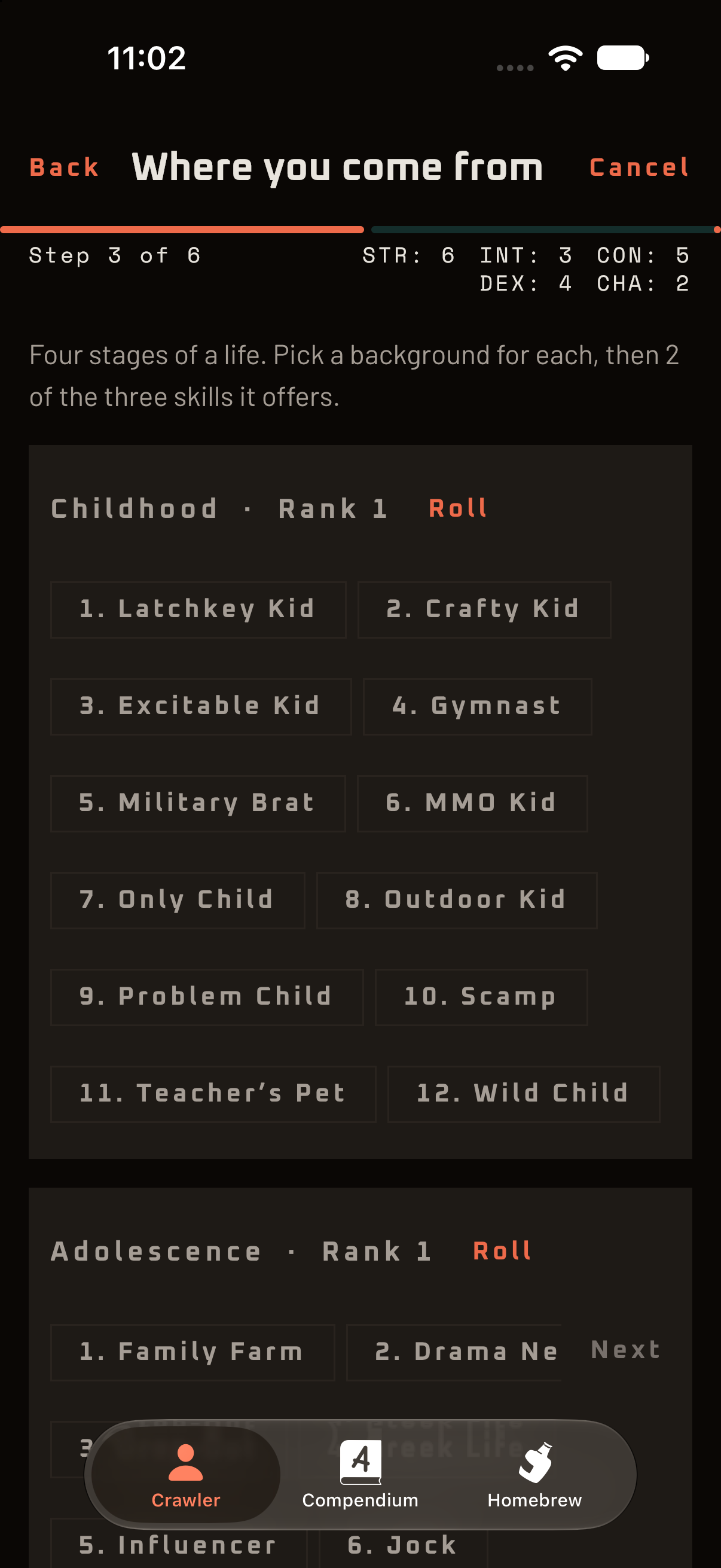
Starting a new crawler used to mean the rulebook, a pencil and a strong cup of coffee. The guided builder walks you through it in rulebook order, checking your work as you go: who you are, your stats, your background and combat skills, what you’re simply handed, your foibles, and your starting gear.

Nothing is saved until you finish, so you can wander off, change your mind and back out without leaving half a crawler lying around. Prefer to fill everything in yourself? There’s a blank sheet for that, too.

  • Seven ordered steps from identity to starting equipment
  • Warns before it throws away your progress, saves nothing until you finish
  • A blank crawler is still one tap away for the rulebook veterans
System AI

Seven steps to a legal crawler. I would call it foolproof, but I have met your table.

A step in the guided character builder, partway through assigning stats.
The background skills step of the guided character builder.

03 · Checks and dice

Tap a stat. Find out what to roll. Roll it.

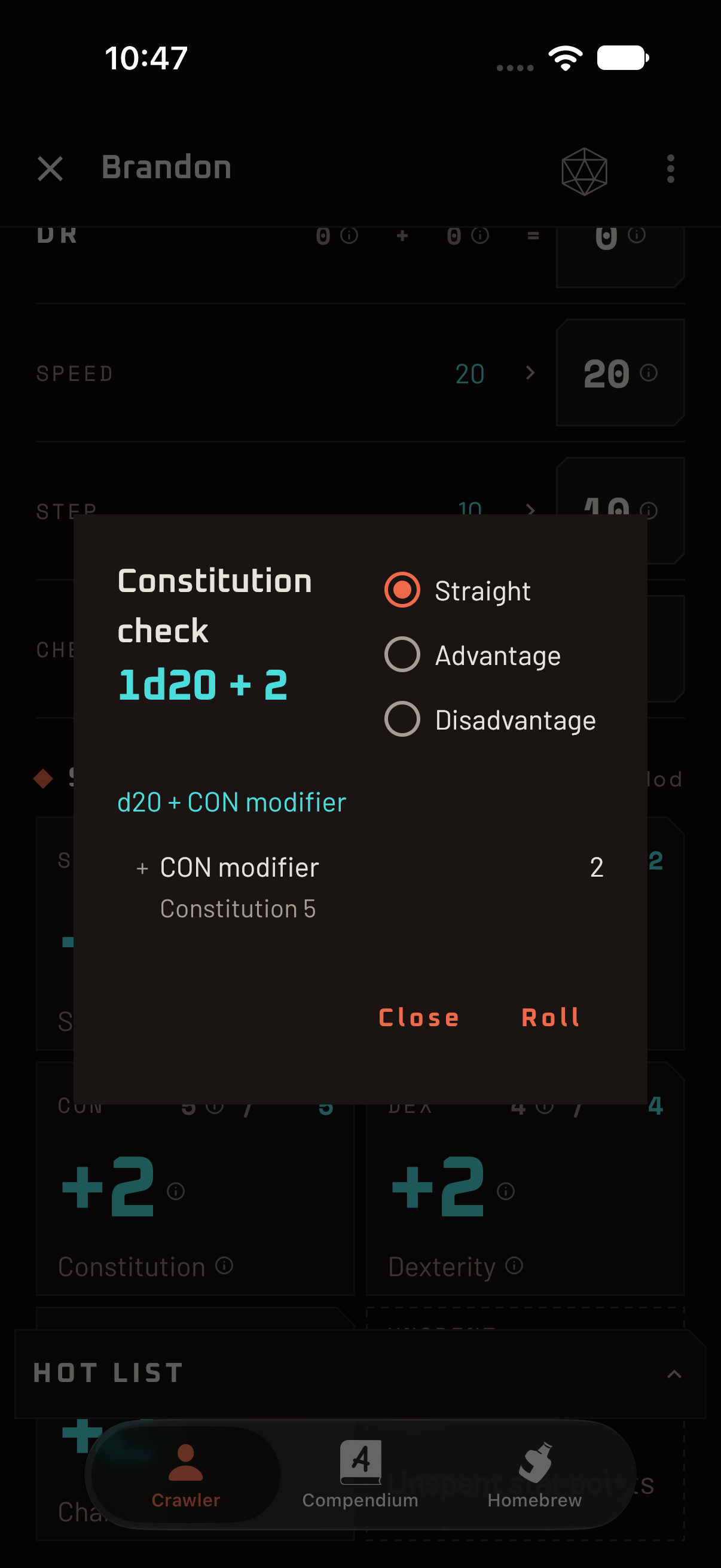
“Roll a Strength check” is easy to say. Crawler Vault tells you exactly what that means: a d20 plus your modifier, with your actual numbers filled in. Skills work the same way, and tapping a skill’s name opens its full entry, so nobody has to flip to the right page.

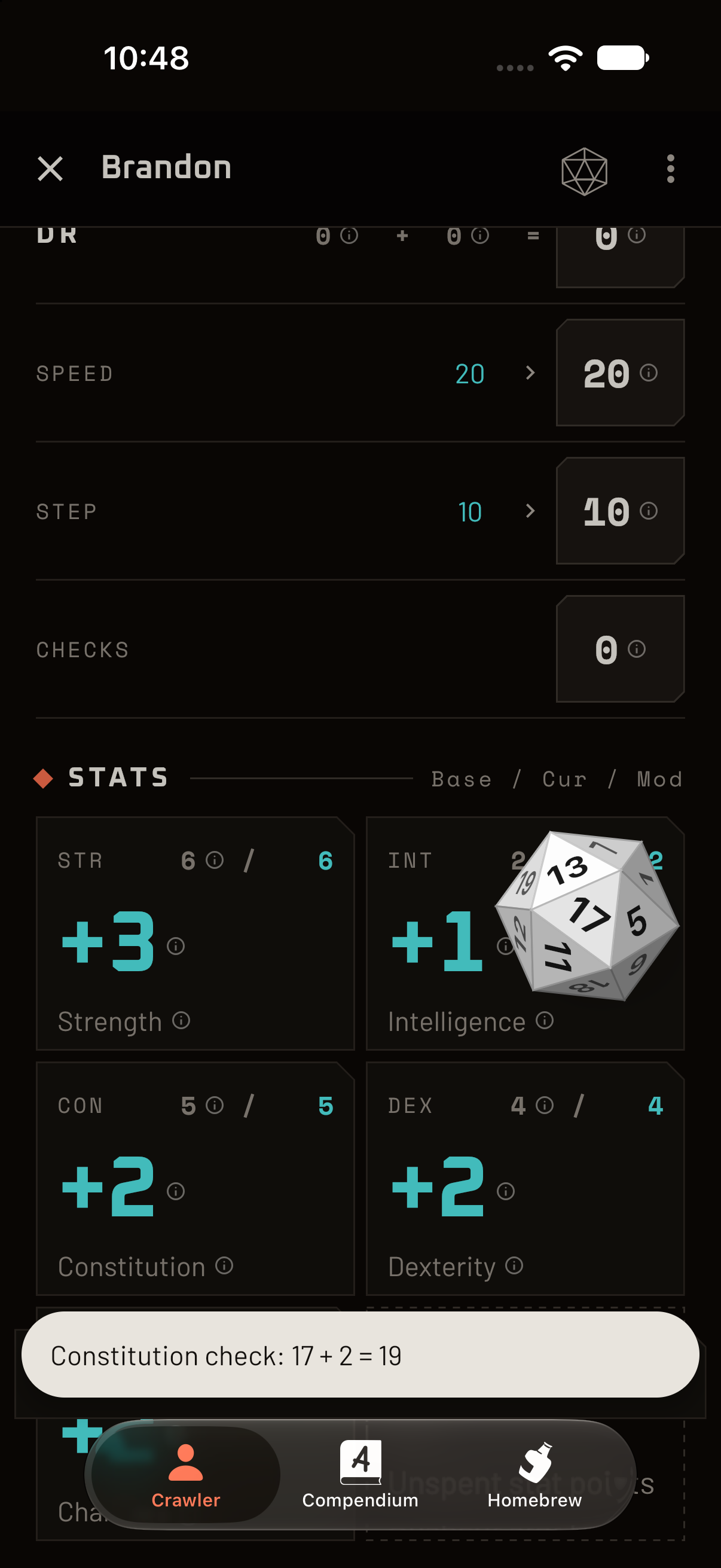
Ready to commit? Roll right from the sheet. The dice tumble across the screen, settle, and the result goes into your roll history, where you can look back at it, or roll it again.

  • Check formulas with your real stat and skill values applied
  • Attack to-hit, damage and skill entries one tap away
  • An on-screen dice roll with a history of your last 50 rolls
System AI

The dice will tumble, physics will occur, and a number will appear. Several of you call this “tension”. I call it “Tuesday”.

A dialog explaining a Strength check as one d20 plus the Strength modifier.
Dice mid-tumble over the character sheet.

04 · Buffs and debuffs

What is happening to you, finally on the record.

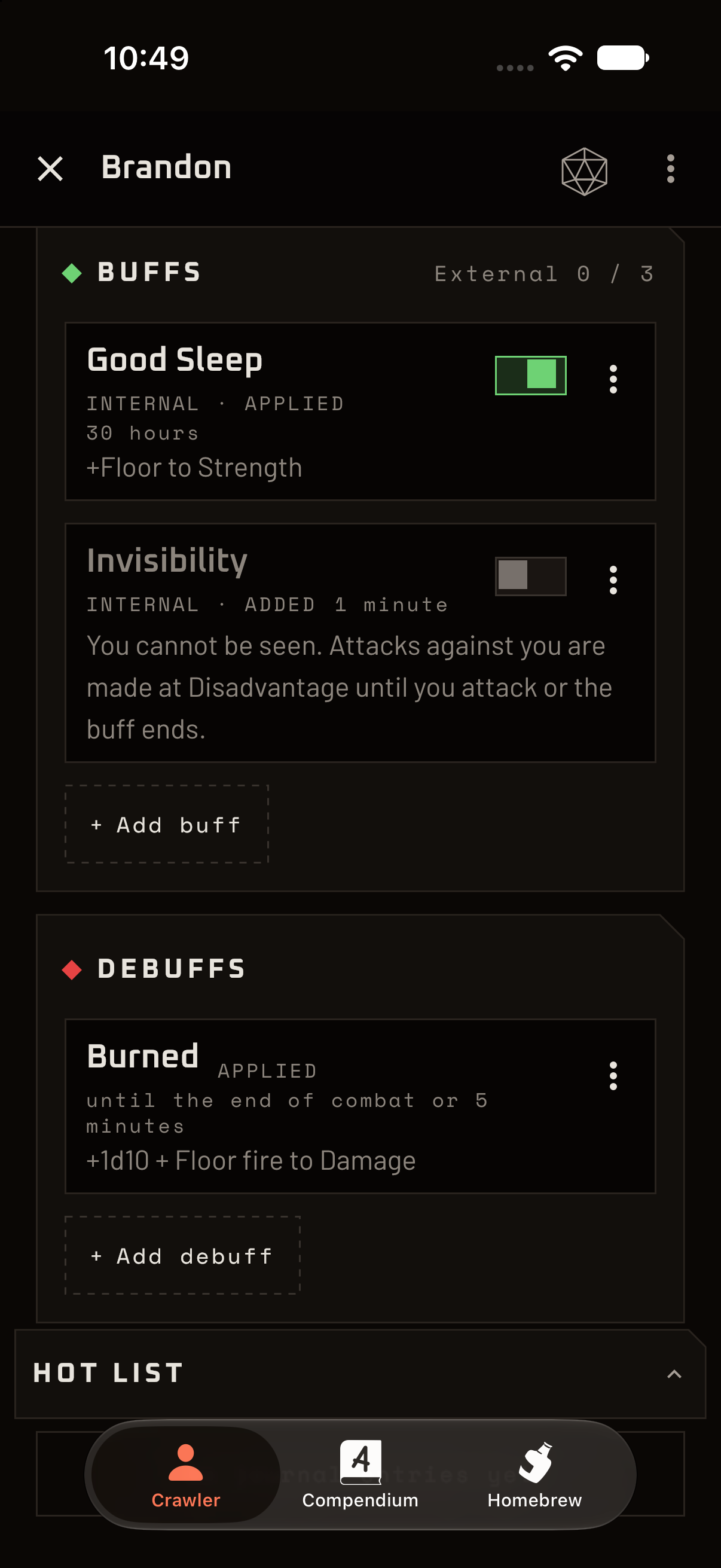
Buffs and debuffs get their own section, split into the good and the bad. Each one shows what it does, where it came from and how long it lasts. Switch buffs on and off as the fiction demands, record the unexpected ones that happen mid-fight, and watch your numbers follow along.

The sheet knows the small print, too. Buffs on gear you’re only carrying stay quiet until you equip it, stackable debuffs stack, and an expired effect stays put until you decide it is gone.

  • Internal Buffs, External Buffs and Debuffs, kept apart and easy to scan
  • Durations and cooldowns recorded right on the row
  • Add one-off effects on the fly, including ones that aren't in the book yet
System AI

You may hold three External Buffs. A fourth is not forbidden. It is merely flagged, so everyone can see.

The Buffs and Debuffs section showing active buffs, a debuff with a countdown and a cooldown.

05 · Progression

Grow your crawler, floor by floor.

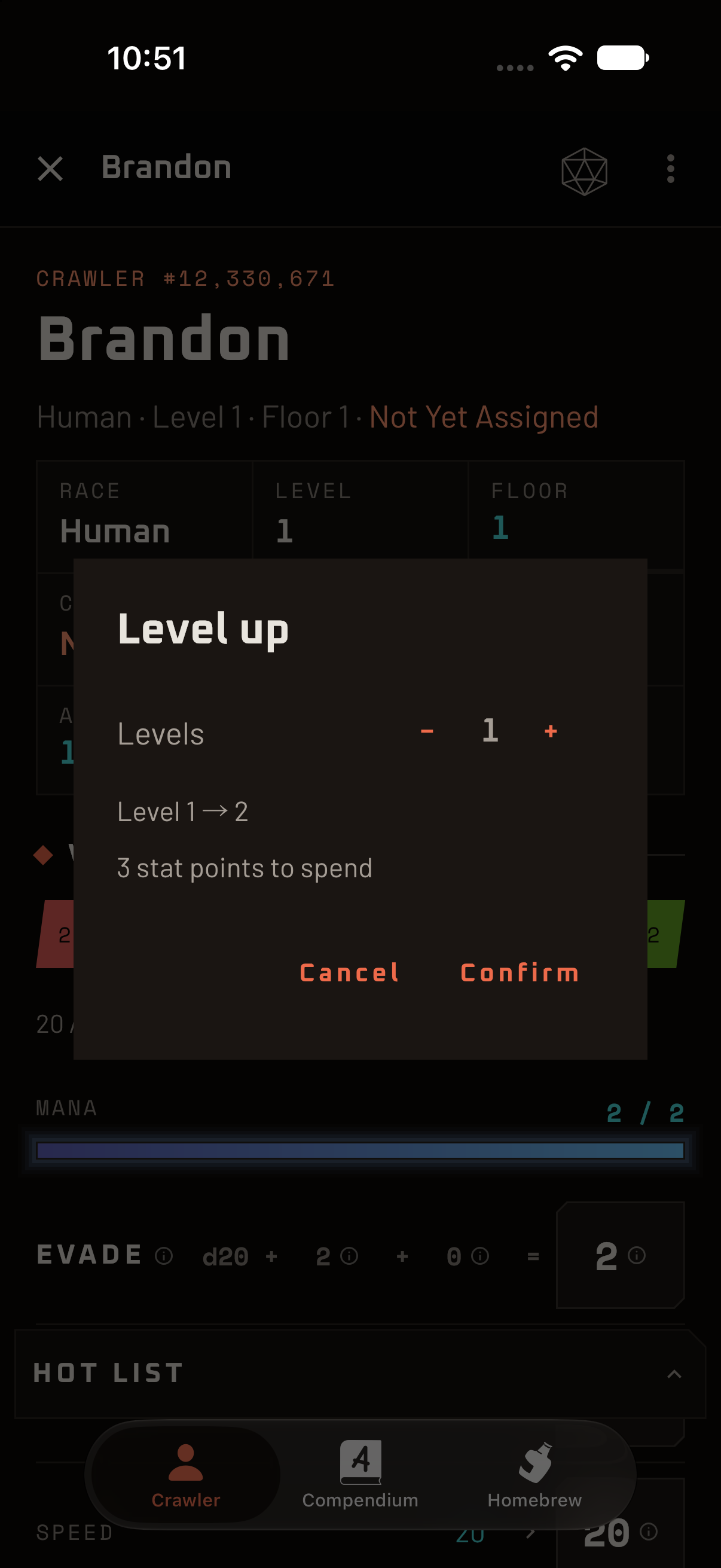
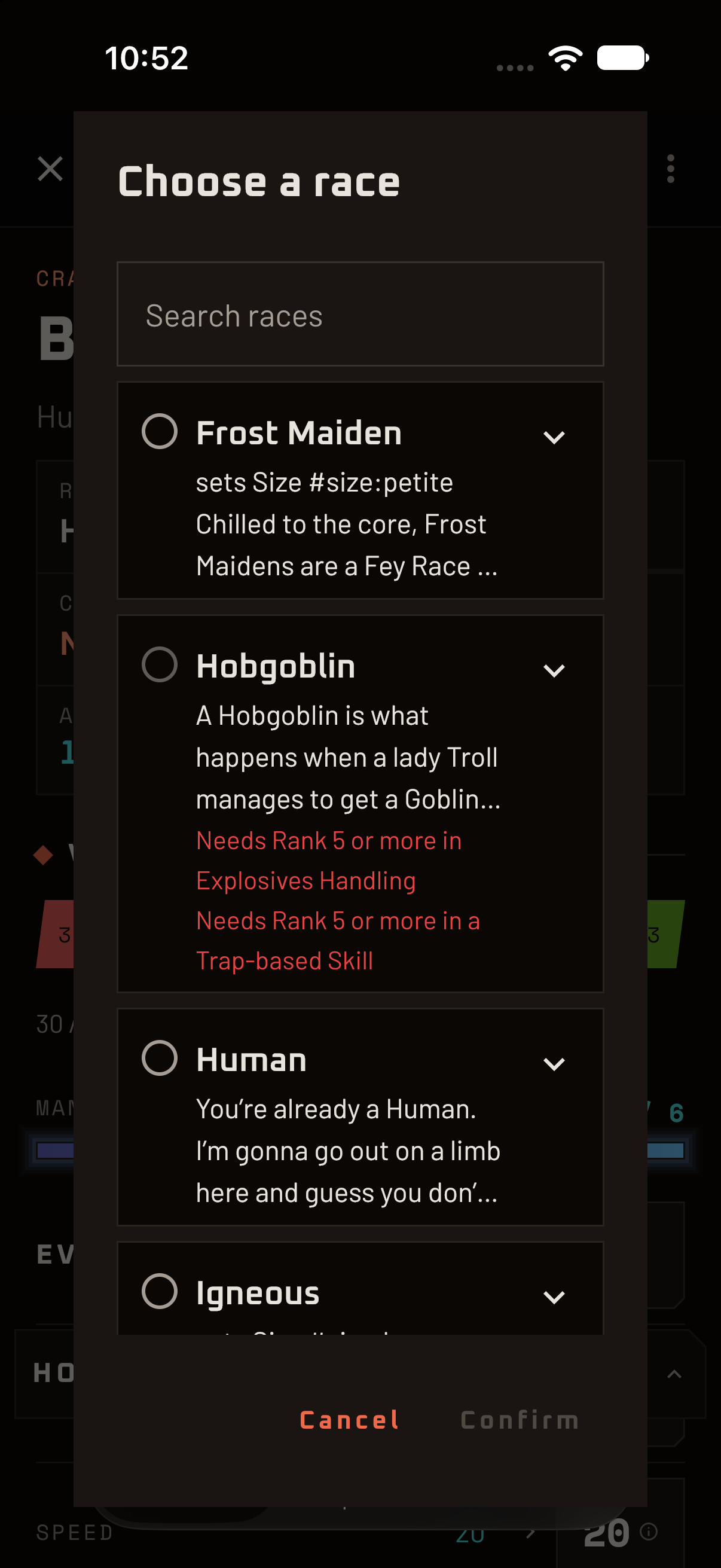
Level up and the sheet hands you the stat points and keeps count until they’re spent. Reach the third floor and it quietly adds a “Choose a race” and a “Choose a class” to your action items. The pickers show what each option gives you, and which ones you don’t qualify for yet.

Trained skills get a checkmark when you use them, so at the end of the session you can see at a glance which ones earned a shot at advancing. Descend, level, advance, repeat. The sheet remembers the bookkeeping.

  • Level-ups with stat points banked and distributed the way the floors demand
  • Races and classes with clear requirements, benefits and drawbacks
  • Skill advancement tracking, built right into the sheet
System AI

Floor three. Pick a race and a class. No pressure. They are only permanent, and I will be watching.

The level-up dialog showing how many stat points are available to spend.
The race picker listing races with a summary of what each one gives.

06 · Attacks, skills and gear

The things you actually do, a thumb away.

Attacks list their to-hit and damage ready to roll. Skills show their rank, their stat and their check at a glance, and you can add one from the catalogue or invent your own when the table improvises (as tables do). Gear slots into equipment positions, with the buffs it grants coming and going as you equip and unequip.

  • Pick new skills from the full catalogue or create your own mid-session
  • Equipment slots and an inventory that understand what's worn and what's carried
  • Skills granted by gear, race or class can be switched off and back on again, not lost
System AI

You’ve equipped a ring you found in a dumpster. The sheet has updated your stats. I have updated my opinion of you. We’re both busy.

The attacks and skills panes side by side on a tablet.

And then some

Problems you didn't know you had. Solved anyway.

We kept finding small, annoying things at the table and fixing them. Here are some you may not have realized were fixable.

  • A hot list that asks first

    Pin your potions and your go-to spells to a quick-use strip. Tap one and it asks how many you want to use, with a stepper, because a stray thumb should not cost you a healing potion.

    “Are you sure you want to drink that? I only ask because last time, you weren't.”

  • A journal that knows which floor you're on

    Jot a note mid-session and it is stamped with the floor you were on. Months later you can still find out who told you about the back door.

    “Your notes are timestamped by floor. This will be extremely helpful when we hold the memorial.”

  • Roll history, with a re-roll button

    The last fifty rolls are one tap away, formula and result together. Repeat one without rebuilding it, or settle a "did you really roll a 20?" dispute with evidence.

    “I remember every roll you've made. I'm choosing to be supportive about it.”

  • Homebrew without the homework

    Write your own gear, skills, buffs, debuffs, races and classes in a homebrew pack, then export it so the rest of the table can import it. Your table's weirdest idea can sit right next to the official ones.

    “You wrote your own race. How adorable. It has a minimum Charisma requirement of zero.”

  • Rules that warn, not scold

    Break a rule and the sheet tells you, plainly, and then gets out of your way. It's your table. It just thinks you should know.

    “I flagged it. You may proceed. I'll be over here, not judging.”

  • Reminders at the right floor

    Reach floor three and the sheet adds the new decisions to your action items. No hunting through the rulebook for what just unlocked.

    “Something new has unlocked. Try to look surprised.”

  • Tap anything, learn everything

    Skill names, attacks and check types open the full entry or the roll guidance. Rules lookup stays one tap from wherever you already are.

    “Knowledge is power. That's why I keep so much of it to myself.”

  • Same crawler, any screen

    Android in your pocket, an iPhone at the table, a Mac on the DM's side. The same sheet, laid out for the screen in your hand.

    “Wherever you go, I will already be there. That's not a threat. It's just architecture.”

Get it

Android. iOS. macOS.

The same crawler on whatever you roll with. Store listings are on their way.

  • AndroidPhones and tablets
  • iOSiPhone and iPad
  • macOSApple silicon Macs
  • Badge goes here App Store Coming soon
  • Badge goes here Google Play Coming soon
  • Badge goes here Mac App Store Coming soon

Descend with confidence. Or at least with correct arithmetic.

System AI

Download it. Or don’t. I’ll be here either way. I’m contractually everywhere.